

Elegant Switch On Interactive Report In Oracle Apex
 |
1.Function and Global Variable Declaration
$(function() { $("#movie_ig").on("interactivegridviewchange", function(event, data) {
if (data.view === "grid" && data.created) {
$("#movie_ig_ig_grid_vc").grid("hideColumn", "SHOW_DATA");
}
});
})
2. Inline CSS
white-space: normal;
}
#movie_ig .a-GV-cell {
height: 41px;
}
/* by removing the height the edit fields will be centered */
#movie_ig .a-GV-cell .a-GV-columnItem {
height: auto;
}
.wrap-cell {
max-height: 128px;
white-space: normal;
overflow: hidden;
}
#movie_ig .a-IconList-item {
width: 142px;
height: 164px;
text-align: center;
}
/* fix icon view styles */
.a-TMV .a-IconList-item.is-selected,
.a-TMV .a-IconList-item.is-selected.is-focused {
background-color: #ecf3ff;
}
.a-TMV .a-IconList-item.is-focused {
box-shadow: 0 0 0 1px #4696fc inset, 0 1px 2px rgba(0,0,0,.1);
}
3. IG - SQL Query
select ROWID,
OID,
CAT_NAME_ENG,
CAT_NAME_BANGLA,
STATUS_ID,
oid SHOW_DATA,
'<span style="white-space: nowrap;">'
||'<a href="javascript:void(0);" '
||' class="high t-Button t-Button--success '|| decode(oid,'N','t-Button--simple','t-Button--success')||' t-Button--pillStart">Yes</a>'
||'<a href="javascript:void(0);" '
||' class="medium t-Button t-Button--danger '|| decode(oid,'Y','t-Button--simple','t-Button--danger')||' t-Button--pill">No</a>'
||'</span>' SHOW_DISPLAY
from CATEGORY

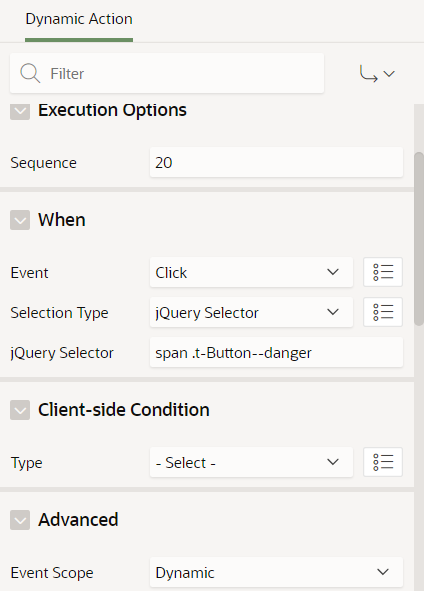
var view = apex.region("movie_ig").widget().interactiveGrid("getViews", "grid");view.model.setValue(record, "SHOW_DATA", 'Y');
$(this.triggeringElement).removeClass("t-Button--simple");
$(this.triggeringElement).parent().find('.t-Button--danger').addClass("t-Button--simple")6. when click No
record = view.model.getRecord($(this.triggeringElement).closest('tr').data('id'));
view.model.setValue(record, "SHOW_DATA", 'N');
$(this.triggeringElement).removeClass("t-Button--simple");
$(this.triggeringElement).parent().find('.t-Button--success').addClass("t-Button--simple")7. Create a Dynamic Action
When Press Add Row
When Press Add Row
Select Type: Region
Region: YOUR IG
when True
Execute JavaScript Code
$("#movie_ig").find("tr.is-selected td.SHOW_DISPLAY").html('<span style="white-space: nowrap;"><a href="javascript:void(0);" class="high t-Button t-Button--success t-Button--simple t-Button--pillStart" tabindex="0">Yes</a><a href="javascript:void(0);" class="medium t-Button t-Button--danger t-Button--danger t-Button--pill" tabindex="0">No</a></span>')
Set SHOW_DISPLAY column Properties
and then Appearance >> CSS Classes = SHOW_DISPLAYSHOW_DISPLAY column Type = DISPLAY ONLY